I needed to share my phone’s internet connection with several computers over Ethernet. The computers don’t have WiFi, so the phone’s hotspot wasn’t an option — and USB tethering only shares with one device at a time.
I have a pile of NanoPi boards sitting around doing nothing, so the obvious move was to press one into service as a router: plug the phone in via USB tethering, run a cable out the Ethernet port, done. Should be straightforward. It wasn’t.
Every problem that came up looked like a different problem than it actually was. This post is that debugging trail: three bugs found by watching things break, and one caught by reading the code before running it.
Written with the help of Claude. Total time from flashing the SD card with Armbian to a working router was around 6 hours, including delays where Claude was waiting on my input.
Setup
NanoPi Neo 2 — Allwinner H5, quad-core Cortex-A53 @ 1GHz, 512MB DDR3, ARM64. Running Armbian/Debian 13 “trixie,” headless, no GUI.
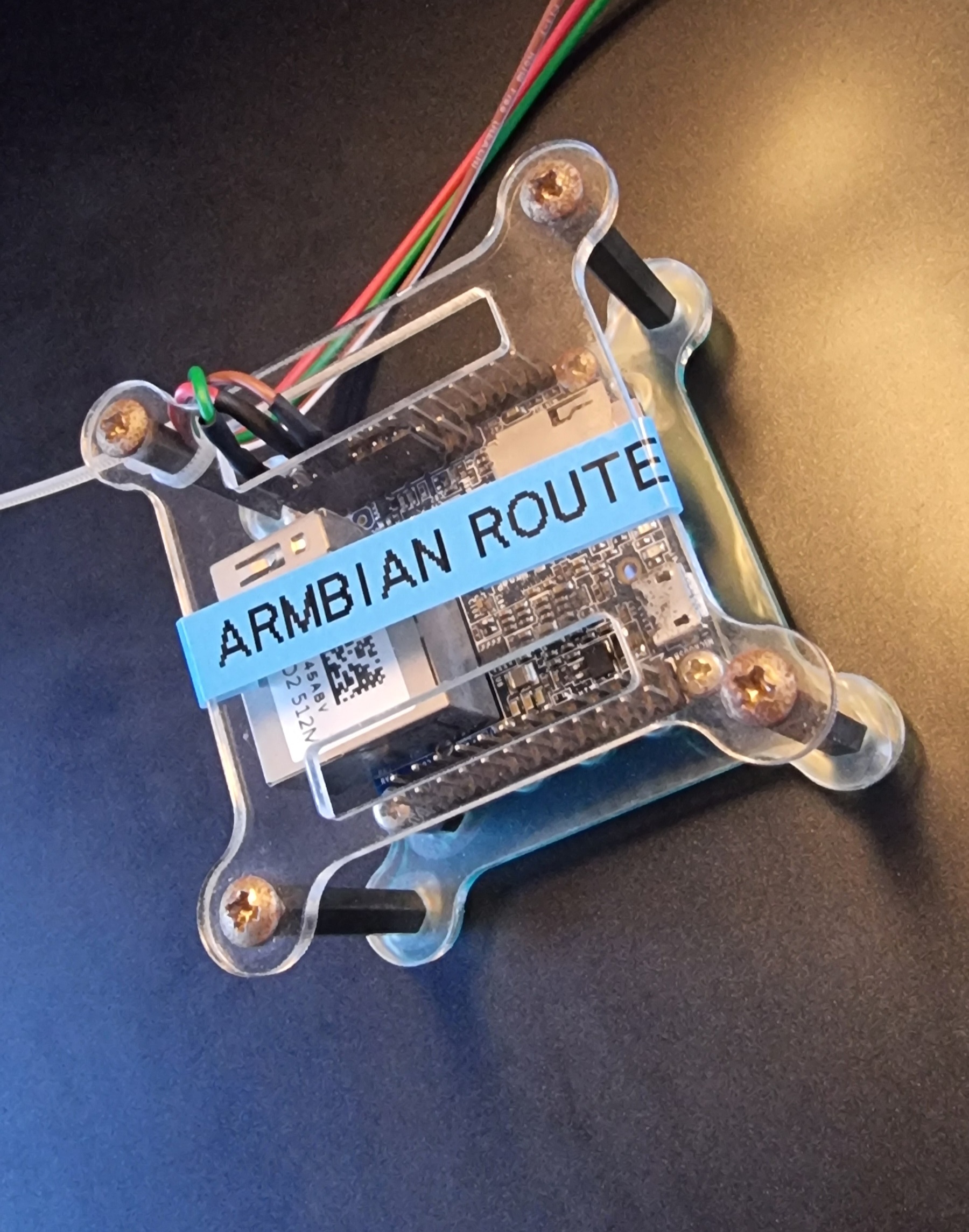
Phone connected via USB tethering as the only internet source. The onboard Ethernet port connects to a switch, which feeds the other computers on the network.
Goal
Share the phone’s tethered connection over Ethernet, with automatic DHCP leases and working DNS — in a package that’s small, easily portable, and fully customisable.
Implementation
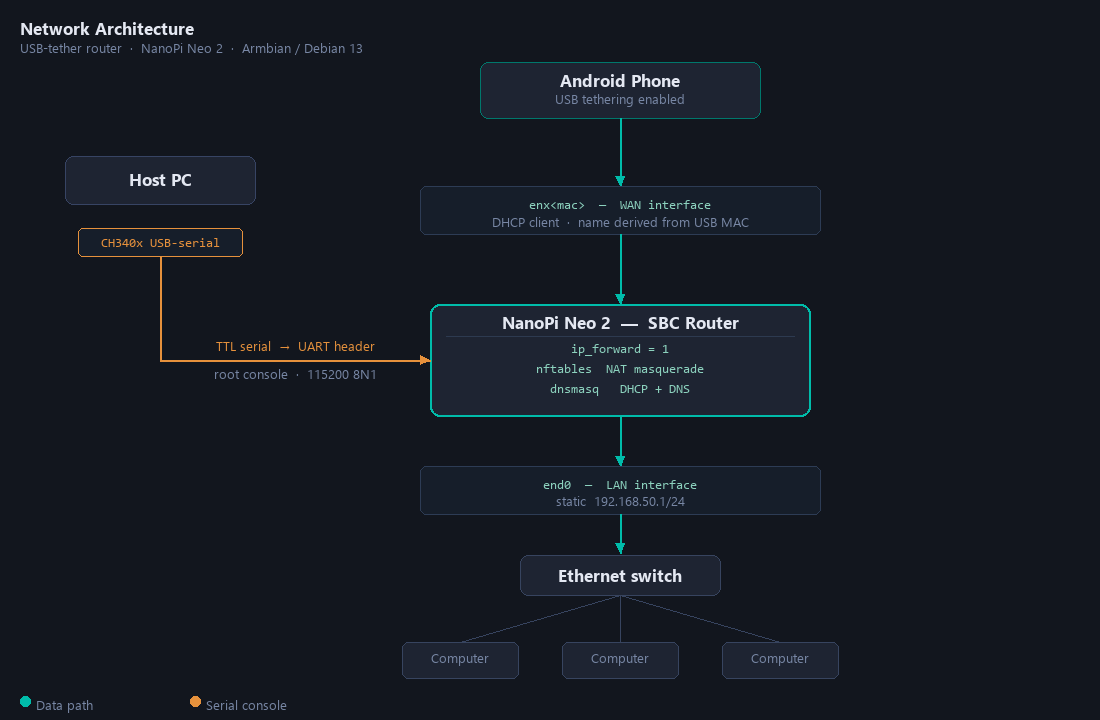
Stack choices: dnsmasq for DHCP and DNS in one process; nftables because it’s the Debian trixie default; netplan + systemd-networkd because that’s what Armbian already uses and fighting the existing stack gains nothing. Access during setup was a serial console over USB-to-serial (115200 8N1) — no SSH yet, no network yet, classic chicken-and-egg.
One design decision worth calling out before the bugs: the nftables NAT rule deliberately never hardcodes the WAN interface name. USB tethering gives you an interface named enx<mac>, where <mac> is the phone’s USB MAC address — which changes when you swap phones or when the same phone randomises its MAC. The rule matches “traffic from the LAN subnet leaving on anything that isn’t the LAN interface” instead. Validated live: the router kept routing, without any config change, the moment the phone reconnected with a brand-new interface name.
Bug #1 — netplan’s sort order is not what you think it is
Symptom: wrote a new netplan file 60-lan-static.yaml to give end0 a static IP. netplan apply succeeded with no errors. end0 kept getting a DHCP lease.
Root cause: netplan generates systemd-networkd unit files with names like 10-netplan-<device-id>.network, where <device-id> is the key you used under ethernets: in the YAML — not derived from the source YAML file’s numeric prefix at all. Armbian ships a file that matches every interface with the device id all-eth-interfaces, generating 10-netplan-all-eth-interfaces.network. The new file used device id end0, generating 10-netplan-end0.network. systemd-networkd applies the alphabetically first matching .network file per interface and stops — it doesn’t merge. "all-eth-interfaces" sorts before "end0", so the generic DHCP rule kept winning.
The mental model most people carry — “higher-numbered netplan files win, like /etc/rc.d-style ordering” — is simply wrong here. The failure mode is completely silent: no error, no warning, netplan apply reports success, and nothing changes.
Fix: rename the device id to sort before all-eth-interfaces. Using 0-end0-static generates 10-netplan-0-end0-static.network, which sorts first. Confirmed via journalctl -u systemd-networkd showing end0: Reconfiguring with /run/systemd/network/10-netplan-0-end0-static.network.
A secondary gotcha in the same area: systemd-networkd only assigns a static address once link carrier is detected. With no Ethernet cable plugged in during testing, the address came and went with carrier state. The netplan key for this is ignore-carrier: true. The obvious first guess, configure-without-carrier, is not a real key — netplan rejects it with a parse error (at least a specific one).
Bug #2 — dnsmasq ships with no upstream DNS servers on a systemd-resolved system
Symptom: a LAN client got a DHCP lease, ping 8.8.8.8 worked (routing and NAT were fine), but ping google.com failed with “Temporary failure in name resolution.” On the router itself, resolvectl query google.com resolved instantly.
Root cause: the Debian dnsmasq package’s systemd unit always starts dnsmasq with -r /run/dnsmasq/resolv.conf, a file populated by an ExecStartPost hook that calls the legacy resolvconf tool. This SBC uses systemd-resolved, not resolvconf. The hook ran, found nothing to do, and /run/dnsmasq/resolv.conf was never created. dnsmasq’s -r flag pointing at a nonexistent file leaves it with no upstream nameservers at all, silently — it doesn’t error at startup, it just forwards nothing. Enabling log-queries confirmed the queries were arriving and being forwarded into a void.
Fix: bypass the broken resolvconf integration. Add no-resolv (ignore the -r file entirely) and an explicit server=127.0.0.53 (systemd-resolved’s stub listener, already confirmed working on the router). After restart, journalctl -u dnsmasq showed using nameserver 127.0.0.53#53. Client DNS still failed — which meant there was another bug.
Bug #3 — the NAT rule was masquerading loopback traffic, which looked identical to Bug #2
Symptom: after fixing Bug #2, ping google.com from the client still failed the same way. dnsmasq’s query log showed it faithfully forwarding every query to 127.0.0.53 — and never logging a reply. Yet querying 127.0.0.53 directly from the router worked instantly.
Root cause: the original nftables masquerade rule was:
oifname != "end0" masquerade“Masquerade anything leaving on any interface that isn’t the LAN port.” That’s broader than intended. When dnsmasq — a process running on the router — queries 127.0.0.53, that packet’s egress interface is lo (loopback), which is technically “not end0.” The rule matched, rewrote the source address, and broke the request/reply correlation for that loopback traffic. The rule reasoned entirely about where the packet was leaving, never about where it came from.
This is the best bug of the three: two completely separate mistakes (missing resolver file, overly broad NAT rule) produced the exact same visible symptom on the client. They had to be found and fixed one at a time, each confirmed independently before moving to the next. You can’t just throw guesses at identical error messages — you have to actually verify each hypothesis before reaching for the next one.
Fix:
ip saddr 192.168.50.0/24 oifname != "end0" masqueradeScope by source subnet, not just by egress interface. Only traffic originating from the LAN gets masqueraded; the router’s own loopback traffic (source 127.0.0.1, not in 192.168.50.0/24) is left alone. ping google.com from the client succeeded on the first try after reload.
A hardware aside
The serial console setup: a CH340x USB-to-serial converter on the host PC, with TTL serial lines running directly to the SBC’s header pins. No USB conversion on the SBC side. COM6 is the port that converter appears as on the PC.
Two issues came up during the session. First, the serial data was arriving as gibberish rather than text — a power issue affecting the USB-serial converter circuit. Second, COM6 dropped out of the PC’s device list entirely mid-session. Given the timing and the earlier gibberish, both point to the same root cause: something causing the USB-serial converter to misbehave or reset rather than any problem with the SBC or its configuration. Worth knowing if you’re doing serial console work: power quality on the converter matters, and a flaky converter will waste your time in ways that look like firmware or config problems.
Packaging it up
Once the router worked, the ad hoc serial-console session became a proper repo with two goals: make it re-runnable on a fresh board, and add a small web dashboard so settings don’t require SSH or serial access to change.
Unlike Part 1, the web UI decisions were made upfront rather than discovered by breaking things:
- Flask, not a bare
http.server— small enough to embed in a single file, and the box already needed Python. - HTTP basic auth is mandatory — any device on the LAN subnet can reach
192.168.50.1. Without auth, anything on the network could silently repoint DHCP/DNS or change the subnet. - Settings apply immediately, except changing the router’s own LAN address — that gets a confirmation page first, since it’s the one change that predictably drops the admin’s own browser session.
Bug #4 — changing the LAN address would have permanently broken the web UI (caught in review)
What almost shipped: the settings page writes the new LAN address, calls the apply script (which runs netplan apply and actually moves the IP), then redirects the browser. That’s it.
The bug: Flask’s dev server binds to a specific IP once, at process start (app.run(host=LAN_ADDR, ...)). Moving the interface’s address out from under an already-running listening socket does not rebind it. After a successful LAN address change, the web UI process would still be listening on the old, now-nonexistent address — permanently unreachable at the new one, with no error anywhere, until someone restarted the service by hand over SSH or serial. The exact same “silent, no error, just doesn’t work” shape as Bug #1, in a completely different layer of the stack.
How it was caught: not by testing — by rereading the code after writing it and asking “what actually happens to the listening socket when the bound address disappears?” Three bugs found by observing real behavior against expectations; one found by simulating the sequence of events before ever running it.
Fix: after a successful LAN-address-changing apply, the handler schedules systemctl restart router-web detached, with a short sleep so the current HTTP response gets a chance to go out first. On restart the process re-reads the config and binds to the new address.
The single-file installer tradeoff
The first cut shipped as install.sh + a shared lib/apply-config.sh + webui/app.py, all needing to sit alongside each other — clean from a DRY standpoint. The requirement was simpler: copy one file onto the board and run it.
The fix was folding each companion file into the script that needs it as a heredoc, written out to its real location at install time. install.sh and install-webui.sh are each single files with zero external dependencies, at the cost of the Python app living inside a bash heredoc rather than its own .py file. The purist solution is a build step that assembles the standalone scripts; here, given the project’s size, embedding directly was judged simpler. A config/ directory of reference file snapshots was kept in the repo for human readability — nobody wants to read Python through heredoc quoting.